Fiji vs ImageJ: what's the difference, and which should you download?
Fiji is ImageJ with plugins, Bio-Formats, an updater and scripting built in; ImageJ2 is the rewrite underneath. A comparison table and which to download.
Contents
Fiji and ImageJ are the same program in two packages. ImageJ 1.x is the original image analysis program from the US National Institutes of Health: small, public domain, and extended by plugins you add yourself. Fiji ("Fiji Is Just ImageJ") is a distribution of ImageJ that comes with hundreds of plugins, the Bio-Formats readers for microscope files, a script editor and an updater, built on ImageJ2, a rewrite of ImageJ's core. For most life-science work, download Fiji; choose plain ImageJ when you want a small, simple, fixed program.
Below: how the three names came about, what each includes, which to download, how to tell which one you have, and ImageJ in the browser.
A short history: NIH Image, ImageJ, Fiji, ImageJ2
| Year | What happened |
|---|---|
| 1987 | Wayne Rasband writes NIH Image for the Macintosh at the National Institutes of Health |
| 1997 | Rasband starts ImageJ, a Java rewrite that runs on any computer with Java: this is ImageJ 1.x, still developed today |
| 2007–2008 | Johannes Schindelin starts Fiji as an easy-to-install package of ImageJ with plugins for biologists; it is first shown publicly at the ImageJ conference in November 2008 |
| 2009–2010 | A team at LOCI (University of Wisconsin–Madison), led by Kevin Eliceiri with Curtis Rueden as lead developer, begins ImageJ2, an NIH-funded redesign of the core |
| 2012 | The papers most people cite: ImageJ (Schneider, Rasband and Eliceiri) and Fiji (Schindelin et al.), both in Nature Methods |
| 2017 | The ImageJ2 paper (Rueden et al., BMC Bioinformatics) |
| 2025 | "Fiji Latest" moves to Java 21, while "Fiji Stable" stays on Java 8 |
The relationship today: ImageJ 1.x is the classic core with its familiar menus and macro language. ImageJ2 sits on top of it with a newer data model and plugin system, keeping ImageJ 1.x plugins and macros working. Fiji is ImageJ2 plus ImageJ 1.x plus a large curated set of plugins, with an updater that keeps all of it current.
Fiji vs ImageJ: the comparison
| ImageJ 1.x | Fiji | |
|---|---|---|
| What it is | The original program by Wayne Rasband and contributors | A distribution of ImageJ (ImageJ2 and ImageJ 1.x) with plugins |
| Plugins included | The core commands only; you add plugins yourself | Hundreds, organised in the menus: Bio-Formats, TrackMate, SNT (tracing and Sholl), Coloc 2, Trainable Weka Segmentation, AnalyzeSkeleton, BigDataViewer and more |
| Microscope files (.czi, .nd2, .lif, .oib…) | Not out of the box: add bioformats_package.jar to the plugins folder | Bio-Formats included |
| Updates | Help › Update ImageJ… updates the core (ij.jar) | Help › Update…, with update sites you switch on for extra plugin collections (for example Neuroanatomy, StarDist, CSBDeep) |
| Java | Bundled with its own Java, or runs on any installed Java 8 or later | Bundled: Java 21 in "Fiji Latest", Java 8 in "Fiji Stable" (2025 onwards) |
| Download size | About 50 MB with Java; the program itself, ij.jar, is about 2.5 MB | Several hundred MB |
| Scripting | The ImageJ macro language; JavaScript and others with extra files | The macro language plus the Script Editor with Python (Jython), Groovy, JavaScript, BeanShell, Ruby, Clojure and Scala, among others |
| 3D and big data | Stacks and hyperstacks in memory | Also 3D viewers and BigDataViewer for data larger than memory |
| Licence | Public domain | GPL (ImageJ2: BSD-2) |
| Start-up and memory | Starts in a second or two, light on memory | Slower to start, more memory, more menus |
| Best for | Teaching, simple measurements, fixed setups, older computers | Research microscopy, unusual file formats, specialised analyses |
Every ImageJ 1.x command is also in Fiji, in the same place, so instructions written for one (Analyze › Set Scale…, Image › Adjust › Threshold…, Analyze › Analyze Particles…) work in the other. Commands that exist only in Fiji, such as Plugins › Analyze › Cell Counter, Coloc 2, TrackMate or Analyze Skeleton, are missing from plain ImageJ until you install the plugin.
Which should you download?
- Download Fiji if you work with microscope files in a maker's format, need a specialised analysis (tracking, colocalisation, neuron tracing, machine-learning segmentation, 3D), or follow a protocol that names a plugin. This is most researchers.
- Download ImageJ 1.x if you want a light, quick program for measurements, counting and figures; if you teach a class and want everyone on the same simple version; or if your computer struggles with Fiji. You can add single plugins later by dropping their .jar into the plugins folder.
- Use both if you like: they install side by side, in separate folders, with nothing shared.
- Skip the install if you cannot install software (a locked-down lab or library computer, a Chromebook, an iPad) or only need a quick measurement: ImageJ.JS, below, runs ImageJ 1.x in the browser.
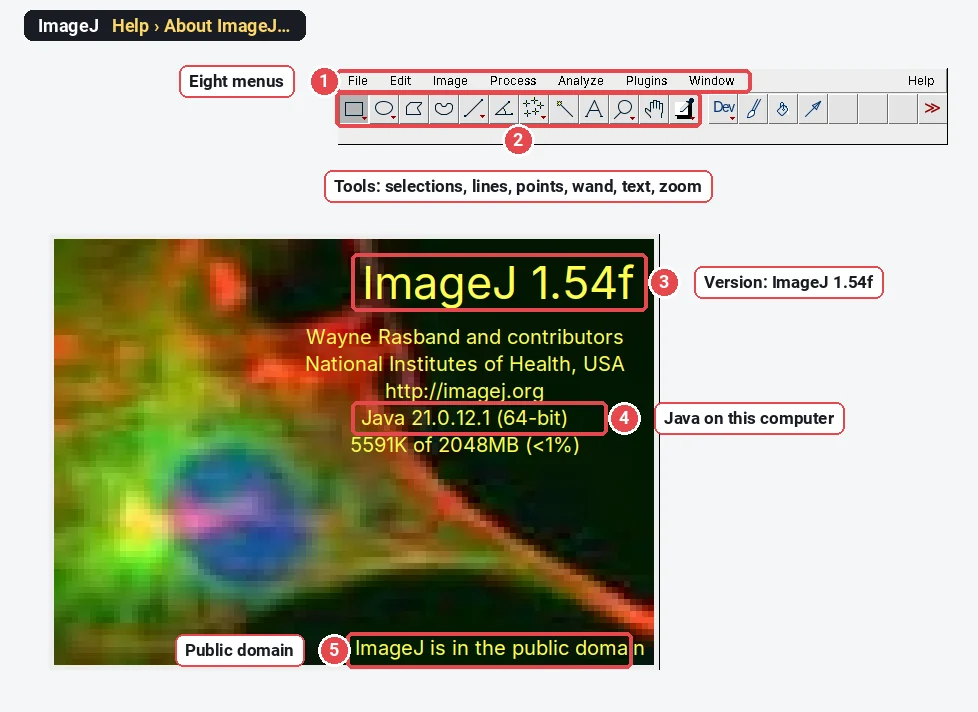
Whichever you choose, write the version into your methods: Help › About ImageJ… shows it.

These are screenshots of plain ImageJ 1.54f, which we ran ourselves. We do not show Fiji here: its main window has the same menus, plus Fiji's own entries and a search bar for commands.
How do you tell which one you have?
- Help › About ImageJ… in plain ImageJ shows "ImageJ 1.54…" with the NIH notice, as above.
- Fiji's Help menu has Update… (the Fiji updater, which manages update sites), its main window has a search bar for commands, and its menus hold many entries plain ImageJ lacks (for example Plugins › Analyze › Cell Counter).
- Help › Update ImageJ… in plain ImageJ updates only the ImageJ 1.x core; in Fiji, use Help › Update… instead, so the plugins stay compatible.
Is there a browser version of ImageJ? ImageJ.JS
Yes. ImageJ.JS runs ImageJ 1.x itself in the browser, compiled to WebAssembly with CheerpJ, from the ImJoy project (ij.imjoy.io, with a newer build at ij.aicell.io). It looks and behaves like ImageJ, with ImageJ 1.x's menus and macros, and needs nothing installed, which helps on a locked-down lab computer, a Chromebook or an iPad. Fiji's plugins are not included. ImageJ online compares the browser options in more detail.
Which papers to cite
Cite the program you used, with its version:
- ImageJ: Schneider, Rasband and Eliceiri (2012), Nature Methods.
- Fiji: Schindelin et al. (2012), Nature Methods, plus the papers of the plugins you used (each plugin's documentation names them).
- ImageJ2, if you used its features directly: Rueden et al. (2017), BMC Bioinformatics.
How to cite ImageJ and Fiji has a methods sentence for each.
For the everyday jobs in either program, start with how to use ImageJ.
Prefer something simpler? Measure in LabCanvas
If you only need the everyday measurements and would rather not install either program, LabCanvas Image Analysis does them in the browser. It is a separate program, not ImageJ, but it uses ImageJ's names and measurement definitions. Counting nuclei, for example:
- Click Open an image (TIFF with its scale, PNG or JPEG), or the Nuclei sample on the start screen.
- In the Count tab, click Find nuclei (Otsu threshold, fill holes, watershed and a sensible minimum size), or set Threshold and the options in Count particles yourself and click Count.
- Read the Particles table and the Summary row (Count, Total Area, Average Size, %Area, Mean); Send to Graphs or Copy them.
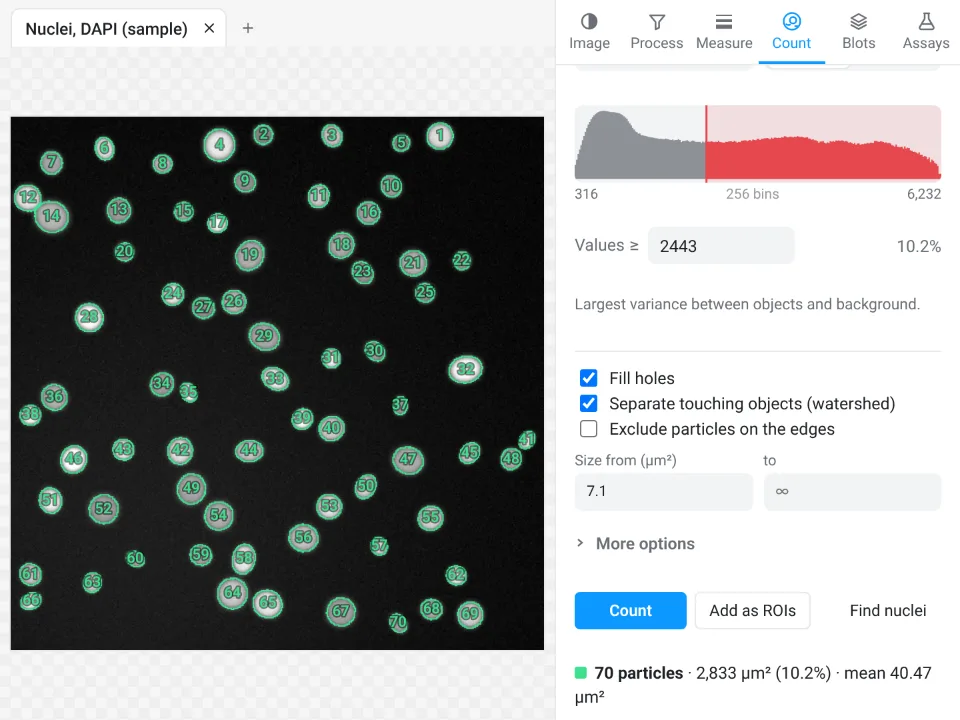
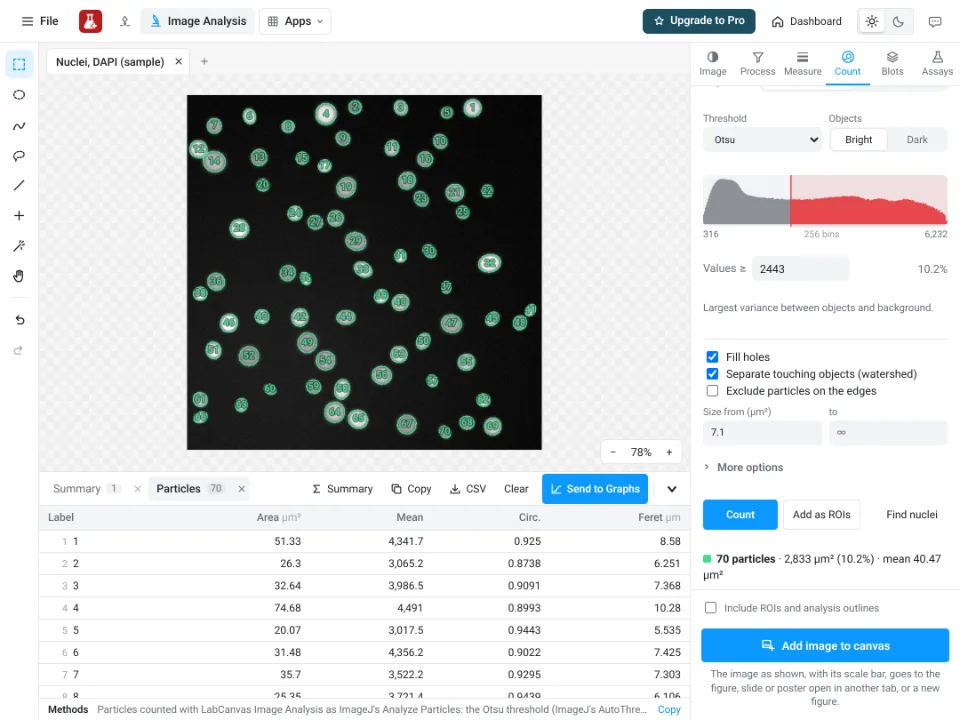
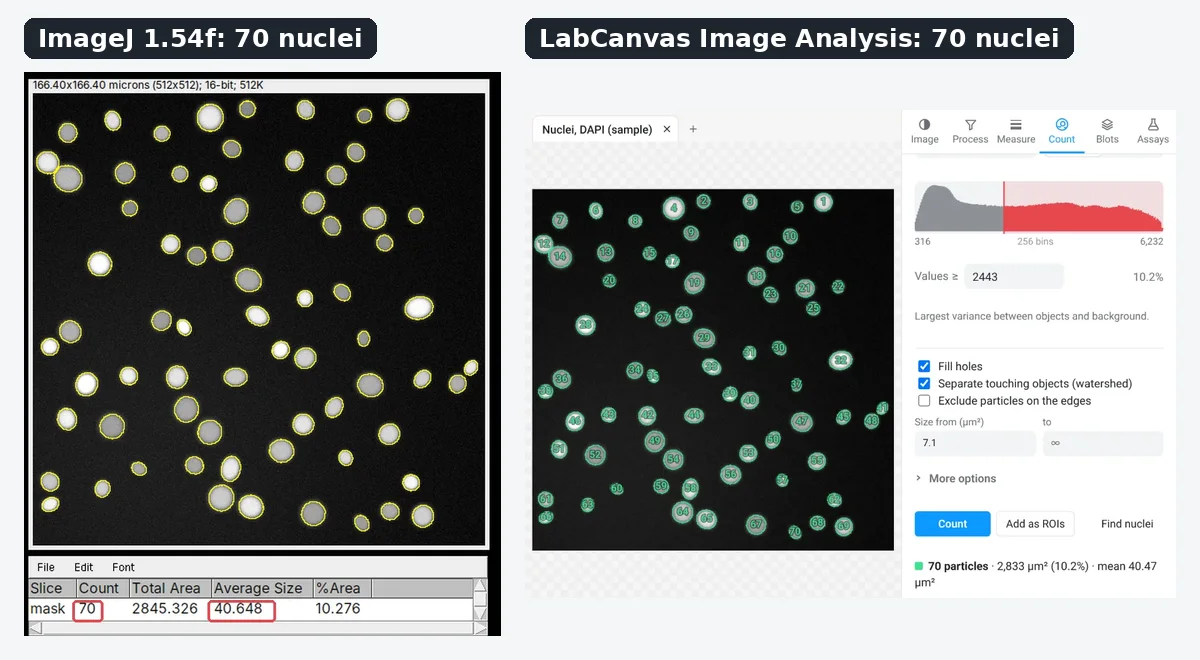
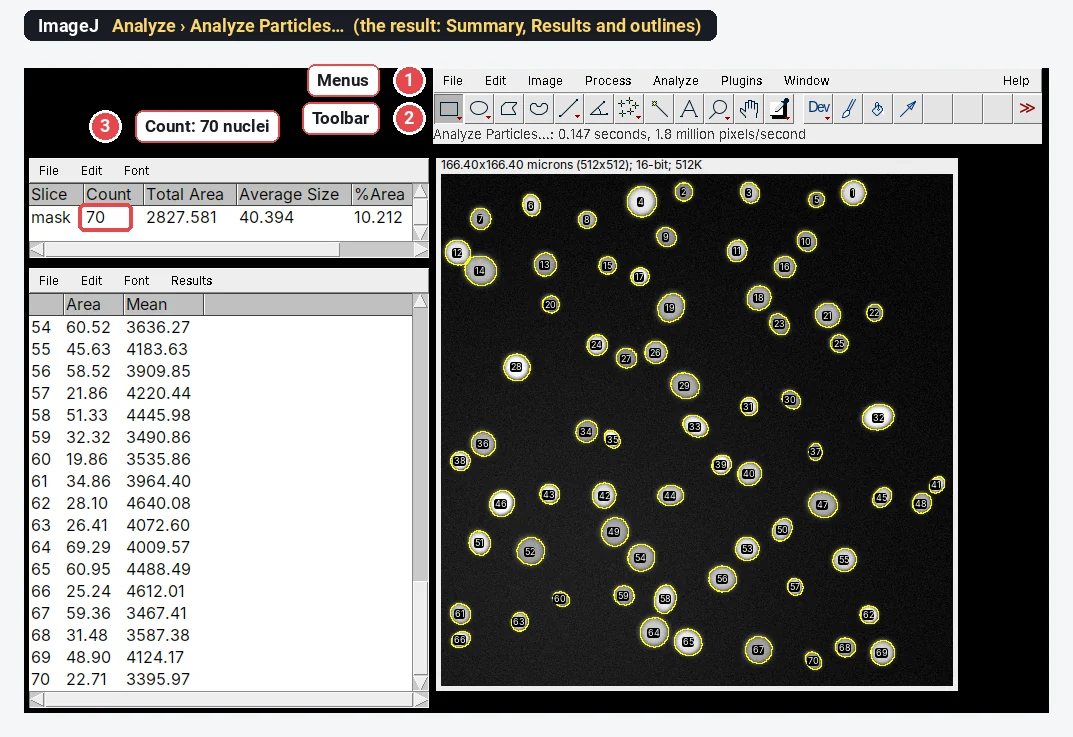
On the built-in nuclei sample that gives 70 nuclei, mean area 40.47 µm², 10.2% of the field. ImageJ's Analyze Particles counts the same 70 on that image (average size 40.394 µm²; counting cells in ImageJ shows both).
Why it is a good choice when you do not need Fiji's plugins:
- Nothing to install: it runs in the browser on any computer, a Chromebook or an iPad.
- ImageJ's own names: Area, Mean, IntDen, Feret and the rest, and it opens ImageJ .roi and RoiSet.zip files.
- Guided assays instead of plugins: colocalisation, FRAP, tracking, Sholl and branching, each with its own sample.
- An image check that flags clipped pixels, JPEG compression and uneven light before you measure.
- Free with a LabCanvas account; downloading files (CSV, TIFF, PNG) is part of LabCanvas Pro. Every measurement is checked in more than 4,000 automated tests.
Fiji is still the tool for its plugin ecosystem, macros over thousands of files, deep-learning segmentation (StarDist, Cellpose), Bio-Formats for .czi, .nd2 and .lif files, and very large or 3D data; LabCanvas has no macro language. Open Image Analysis and try a sample. ImageJ and Fiji are independent open-source projects; LabCanvas is not affiliated with them.
References
- Schneider CA, Rasband WS, Eliceiri KW (2012). NIH Image to ImageJ: 25 years of image analysis. Nature Methods 9, 671–675. doi:10.1038/nmeth.2089
- Schindelin J, Arganda-Carreras I, Frise E, et al. (2012). Fiji: an open-source platform for biological-image analysis. Nature Methods 9, 676–682. doi:10.1038/nmeth.2019
- Rueden CT, Schindelin J, Hiner MC, DeZonia BE, Walter AE, Arena ET, Eliceiri KW (2017). ImageJ2: ImageJ for the next generation of scientific image data. BMC Bioinformatics 18, 529. doi:10.1186/s12859-017-1934-z
Frequently asked questions
What is the difference between Fiji and ImageJ?
ImageJ is the program; Fiji is a distribution of it. Fiji ("Fiji Is Just ImageJ") packages ImageJ, both the classic ImageJ 1.x and the ImageJ2 layer, with hundreds of plugins, the Bio-Formats file readers, a script editor and an updater, ready to run. Plain ImageJ 1.x is the small core program on its own.
Is ImageJ or Fiji better?
For most people in the life sciences, Fiji, because it already contains the plugins and file readers they will need (Bio-Formats for .czi, .nd2 and .lif files, TrackMate, SNT, Coloc 2 and many more) and keeps them updated. Plain ImageJ 1.x is better when you want a small, fast, simple program, or a fixed version for a teaching lab.
What is ImageJ called now?
It is still called ImageJ. The original program, ImageJ 1.x, continues in the 1.54 series and its home page moved from imagej.nih.gov/ij to imagej.net/ij. ImageJ2 is the rewrite that Fiji is built on, and Fiji is the download most people mean when they say ImageJ today.
What does Fiji stand for?
Fiji is a recursive acronym: "Fiji Is Just ImageJ". The name says that Fiji is not a different program but ImageJ with a set of plugins and tools packaged around it.
What is ImageJ2?
ImageJ2 is a rewrite of ImageJ's core, started around 2009 at LOCI (University of Wisconsin–Madison), with a data model for large N-dimensional images, a new plugin framework and links to other software, while keeping ImageJ 1.x plugins and macros working. Most people use it without noticing, inside Fiji.
Are ImageJ and Fiji free?
Yes. ImageJ 1.x is in the public domain (it was written at the NIH, a US government agency). ImageJ2 is under the BSD-2 licence and Fiji under the GPL. All run on Windows, macOS and Linux.
Try it in LabCanvas
Every app is free to start in your browser. Create an account and begin.
Start Image Analysis free in your browserKeep reading
ImageJ vs LabCanvas Image Analysis: an honest comparison
ImageJ/Fiji or LabCanvas Image Analysis? Six everyday jobs done in both, six newer ones (macros, vendor files, 3D, StarDist, big images) and which to use.
How to use ImageJ: a beginner's tutorial for the 10 everyday jobs (2026)
How to use ImageJ and Fiji: get started, open an image, then 10 everyday jobs (scale, measure, threshold, count, background, blots) with exact menu paths.
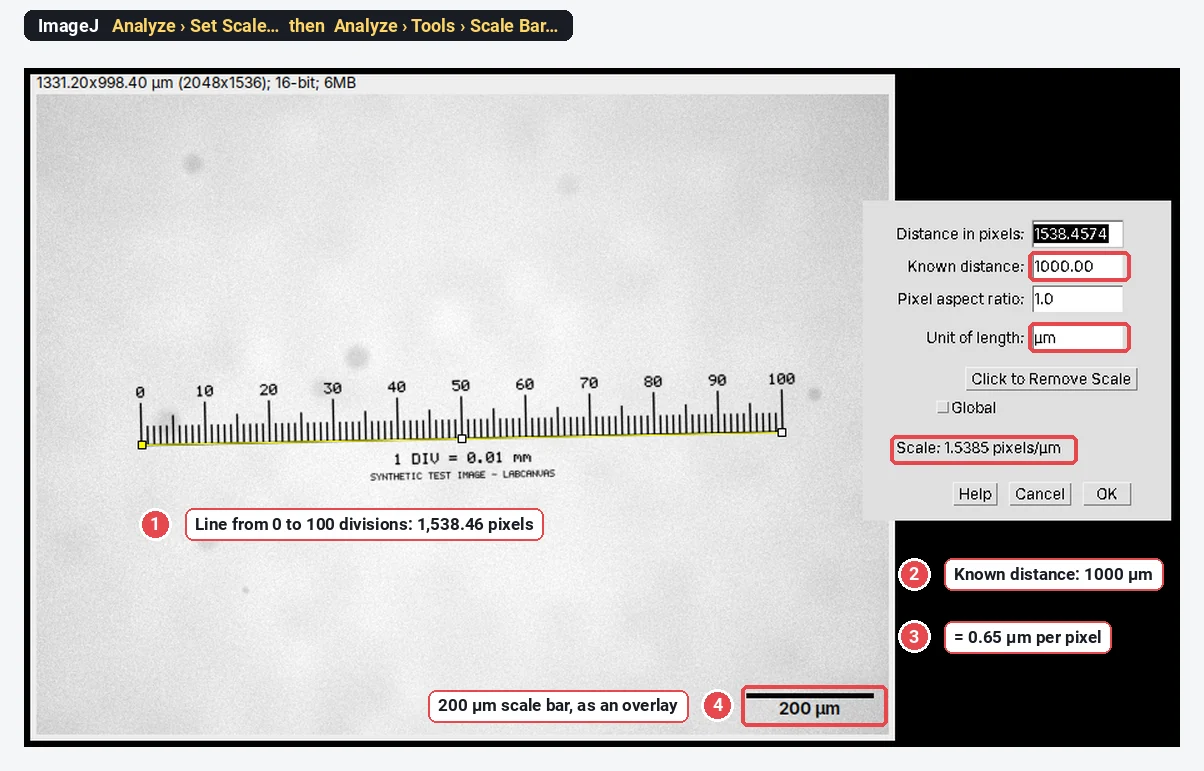
How to set the scale and add a scale bar in ImageJ (with a calibration image to practise on)
Set the scale in ImageJ (Analyze › Set Scale) from a micrometer, scale bar or pixel size, add a scale bar, and practise on a free calibration image.